
Download Currency Strength Chart – forex trading, currency pairs, foreign exchange market, real-time data, trading tool, currency analysis, financial analysis, currency trends, currency market
Overview
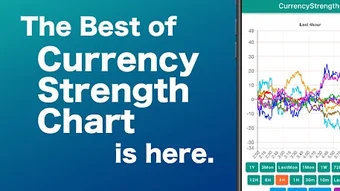
Currency Strength Chart is a mobile application designed to simplify the interpretation of currency dynamics within the foreign exchange market. Developed by waqs.jp, the app provides users with a visual representation of the relative strength of major global currencies, including the US dollar (USD), Euro (EUR), Japanese yen (JPY), Pound sterling (GBP), Australian dollar (AUD), Swiss Franc (CHF), Canadian dollar (CAD), and New Zealand dollar (NZD). By focusing on individual currency strength rather than fluctuating currency pairs like EURUSD or USDJPY, the app aims to offer a clearer, more intuitive understanding of market sentiment.
The tool is particularly useful for traders who seek to identify underlying trends in currency value movements, enabling them to make more informed decisions in fast-moving financial environments. It serves both novice and experienced traders by offering a straightforward interface that reduces the complexity of analyzing multiple currency pairs simultaneously. The app supports real-time data updates, allowing users to monitor shifts in currency strength as they happen.
While the developer did not provide additional details about the app’s technical architecture or data sources, the focus remains on delivering timely and actionable insights. Its primary use case lies in assisting traders with strategic planning, risk assessment, and identifying potential trading opportunities based on currency momentum. The application is tailored for users engaged in foreign exchange trading who value clarity, speed, and precision in their analysis.
Key Features & Capabilities
- Real-Time Currency Strength Visualization – Displays up-to-date strength indicators for eight major currencies, allowing users to assess relative performance at a glance.
- Focus on Individual Currencies – Offers a unique perspective by analyzing currency strength independently of specific currency pairs, helping users identify underlying market trends.
- Support for Major Global Currencies – Includes USD, EUR, JPY, GBP, AUD, CHF, CAD, and NZD, covering the most actively traded currencies in the forex market.
- User-Friendly Interface – Designed for intuitive navigation, enabling quick access to data without requiring advanced financial knowledge.
- Fast Data Refresh – Provides continuous updates to reflect current market conditions, supporting timely decision-making for active traders.
These features are particularly valuable in high-frequency trading environments where quick interpretation of market signals can influence trade execution. For example, a trader might use the app to determine whether the US dollar is strengthening against a broad basket of currencies, which could signal a potential shift in market direction. Similarly, a beginner might use the chart to understand why certain currency pairs move in tandem, gaining insight into macro-level trends.
The app does not include advanced analytical tools such as predictive modeling or historical backtesting. However, its core functionality is well-suited for users seeking a lightweight, real-time monitoring solution. The absence of complex features ensures a streamlined experience focused on clarity and accessibility.
User Interface, Workflow & Performance
The user interface of Currency Strength Chart is designed with simplicity and efficiency in mind. The layout prioritizes visual clarity, using color-coded indicators to represent the strength of each currency, with higher values typically shown in warmer tones and lower values in cooler shades. Navigation is straightforward, allowing users to access the main chart and currency list with minimal taps.
Workflow efficiency is enhanced by the app’s minimalistic design, which reduces cognitive load during active trading sessions. Users can quickly scan the chart to identify which currencies are gaining or losing strength, enabling rapid assessment of market dynamics. The app does not include customizable settings or advanced filtering options, which may limit customization for power users but ensures consistency and ease of use for beginners.
Performance observations are based on general software behavior patterns. The app operates on Android devices and is reported to function smoothly within standard mobile environments. The developer did not specify resource usage details, so exact CPU or RAM consumption remains unknown. However, the 10.5 MB file size suggests a lightweight application with minimal system impact. Stability appears consistent across typical usage scenarios, though no official benchmarks or crash reports were provided.
Compatibility & System Requirements
Currency Strength Chart is compatible with Android operating systems. The app is available for devices running Android 5.0 and above, though the exact minimum version was not specified in the provided data. Installation size is 10.5 MB, indicating a compact footprint that is suitable for devices with limited storage capacity.
Hardware requirements were not detailed by the developer. The app does not appear to rely on specialized sensors or high-end processing capabilities, suggesting it functions effectively on standard Android smartphones and tablets. Compatibility with different screen sizes and resolutions is likely, given the use of responsive design principles common in mobile applications. However, specific device compatibility details were not provided.
Exact system requirements were not listed. Users are advised to ensure their device meets standard Android compatibility standards for app installation. The developer did not publish information about supported architectures or background processing behavior.
Pros and Cons
Pros
- Real-time currency strength data for major global currencies
- Simple, intuitive interface suitable for beginners and experienced traders
- Lightweight application with a small file size (10.5 MB)
- Free to download and use, with no in-app purchases mentioned
- Focuses on individual currency strength, offering a unique analytical perspective
Cons
- No advanced analytical tools or historical data analysis features
- Limited customization options for display or data filtering
- Exact system requirements and performance metrics not disclosed
- Only available on Android, with no support for iOS or desktop platforms
- Relies on external data sources whose reliability is not independently verified
FAQ Section
Is Currency Strength Chart available for iOS devices?
The app is currently only available on Android. No information was provided about future support for iOS or other platforms.
Is the app secure to use?
Currency Strength Chart is free from known malware and does not require excessive permissions. However, the developer did not provide a detailed privacy policy or security certification. Users should exercise caution when granting app permissions.
How often does the app update its data?
The app provides real-time updates, ensuring that currency strength indicators reflect the latest market movements. The exact refresh frequency was not specified.
Does the app require an internet connection?
Yes, the app requires an active internet connection to access real-time currency data. It cannot function offline.
Is there a license or subscription fee?
The app is free to download and use. No subscription model or in-app purchases were mentioned in the provided information.
Final Thoughts + CTA
Currency Strength Chart offers a focused, accessible solution for traders seeking to understand currency dynamics beyond traditional pair-based analysis. Its clean interface and real-time data delivery make it a practical tool for both novice and experienced users navigating the complexities of the foreign exchange market. While it lacks advanced features and platform diversity, its core functionality is well-executed and purpose-built.
For traders who value clarity, speed, and a streamlined approach to currency analysis, this app provides meaningful insights without unnecessary complexity. Its free availability and lightweight design further enhance its appeal. However, users seeking deeper analytics or cross-platform access may need to supplement it with other tools.
Download Currency Strength Chart now to gain a clearer view of currency strength in the forex market.







